I recently installed a new D-Link router (DIR-655... yay gigabit!) on my network which has my DNS-323. I had the network up and running in no time after the typical reset-modem-reset-router dance and an obligatory call to the ISP's outsourcing call center located in India. The finishing touch was to plug in my DNS-323 and check out my new blazing fast transfer rates. I plugged it in and typed in the NAS static IP address that I had memorized... nothing. I realized that the default D-link router IP address (192.168.0.1) is different than the previous Linksys router (192.168.1.1). Meaning that my DNS-323 is probably using the wrong gateway. I was excited to find after a cursory Google search that someone had posted on the D-Link forums with an almost identical issue. The only responder suggested changing the IP of the new router to match the old. After a few unsuccessful IP changes which resulted in me having to reset the router back to factory settings (not fun), I realized that there has to be an easier way, a way to update the gateway of the NAS without being able to get into the settings through a browser. Then I remembered the D-Link Easy Search Utility. Duh...
Steps:
1. Put in the D-Link DNS-323 Install CD. If you don't have the original CD that you can download just the Easy Search Utility from D-Link here.
2. Open the Easy Search Utility program.
3. If your NAS doesn't show up automatically, press the Refresh button.
4. Highlight the desired NAS by clicking on the name.
4. Change the gateway and IP to match your new router's convention.
5. Click Apply. (while you're here you can easily mount your new drives using the tool)
6. Enjoy!
Thursday, June 7, 2012
Wednesday, August 3, 2011
Build Your Own Ladder Golf Set Using Official Dimensions
There are quite a few variations of rung geometry, both horizontal/vertical spacing and diameter. There are no official dimensions so I chose to go with spacing consistent with the most reliable source, laddergolf.com, which says:
Step 1: Materials
For 1 Rack
2 Sets of 3 Bollards:
Step 2: Cutting and Drilling
By using vertical pieces about 12” in length after the T’s are assembled it gives a spacing of about 13”. I chose to go with 3/4” PVC for durability reasons. Many people complain that 1/2” cracks or breaks after a fair bit of use.Glossary of Terms:
Bolas: A Bola consists of 2 golf balls attached together with a piece of nylon rope. Golf Balls are spaced 13” apart.
Ladder: The ladder is the structure that consists of 3 steps each spaced 13 inches apart.
Steps or Rungs: Each ladder has 3 steps. The top step is worth 3 points, the middle 2 and the bottom 1 point.
Toss Line: The line that the players tosses from. Officially is set to 15 feet. For backyard games 5 paces works fine.
Step 1: Materials
For 1 Rack
- 19ft. of 3/4” PVC straight pipe
- 2x 3/4” PVC 90 elbows
- 6x 3/4” PVC Tees
- PVC Glue
2 Sets of 3 Bollards:
- 12’ of ⅜” rope
- 12 golf balls
- Some masking tape
- Something to melt the ends of the rope with
Step 2: Cutting and Drilling
- Cut the 18ft of 3/4” PVC into 5x24” and 8x12” pieces.
- Drill a 3/8” hole through each golf ball (Be careful with newer golf balls that have a liquid core... it could get messy!)
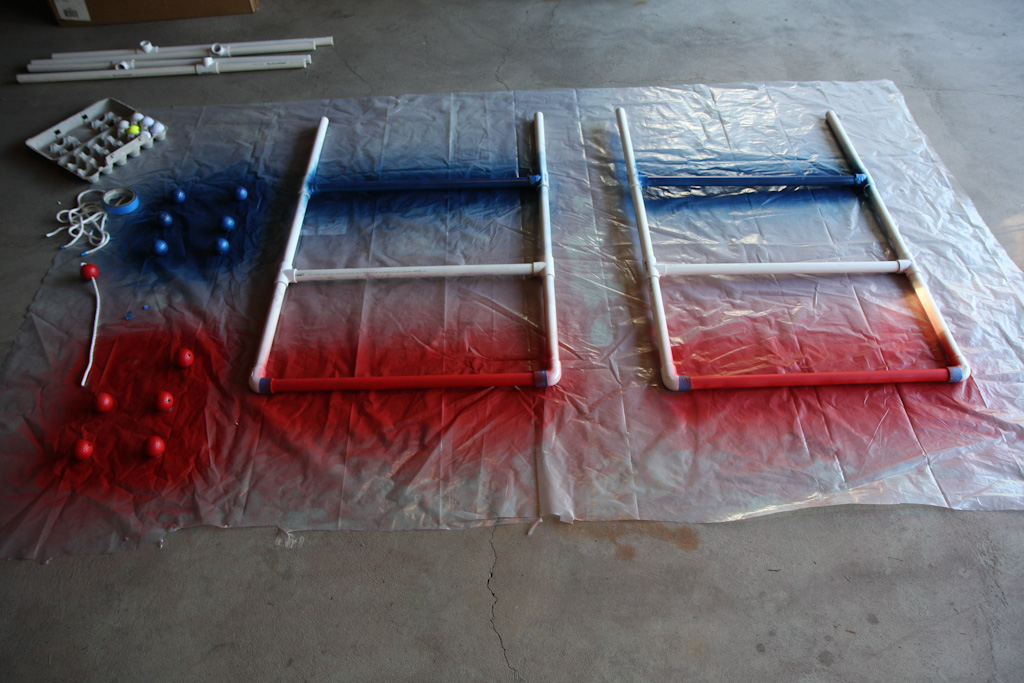
- Before you assemble things is a great time to paint things to make the set a bit more playful and colorful. I chose to go with patriotic colors Red and Blue, leaving one rung PVC White. And colored different bollard sets red and blue.
- Lay the pieces you want to paint out on a piece of plastic or cardboard and spray away. Make sure to get an even coat or two.
- Give the paint plenty of time to dry
Step 4: Cutting and Melting
- Wrap tape around the 3/8” rope every 24” (This will keep the rope from fraying when you cut it, and aid in the melting process)
- Cut in the middle of each piece of tape
- Melt one end of the pieces of rope using a lighter (Be careful and make sure that the melted portion doesn’t get larger than the 3/8” otherwise it won’t fit through the golf balls!)
- Tie a knot in one end of a piece, thread two balls on, and tie a knot on the other end making sure the balls are 13" apart. Cut the excess rope after the knot and melt the second end using the same process with tape as above.
- Remove the tape
- Before you begin gluing think about how you are going to store and transport the set, which will tell you which joints not to glue to allow disassembly. I glued the entire rack except for the feet to the frame.
- Glue the desired joints and let the glue set.

Monday, July 11, 2011
Download and Google Map Lowrance iFinder H2O Trail Data
I'm creating this post because there wasn't really a consolidated step by step on how to get from the GPS SD memory card (or MMC as Lowrance calls it) to the computer, to the correct file type and then to a presentable fashion in Google Maps.

Step-by-step:
1. Save your trail data to the memory card by going to Menu -> System Setup -> Transfer my data. Choose Save, then name the file and choose Save Data.
2. Remove and plug in your memory card to a card reader connected to a computer
3. Copy the previously named .USR file from the memory card somewhere on your computer
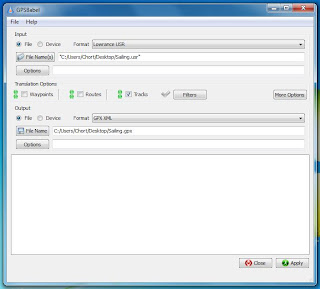
4. Download, install and run GPSBabel (free). For the input file select Lowrance USR and locate the file on your computer. For the output file, select GPX XML and name the output file. In the Translation Options section you can choose what types of data you want to convert and in this case all we're interested in is Trails. Under More Options I like to check Preview in Google Maps, just to make sure I have the right maps before proceeding. Click Apply.
5. Go to www.gpsvisualizer.com and choose your converted GPX file.6. From here I like to see which trails I actually want to show and if any manual data modification is necessary. Then I use a text editor, Notepad++ if you don't have a favorite, to make the fine tune adjustments before repeating step 5.
Wednesday, June 29, 2011
Mt. Marcy by way of Johns Brook Trail
Last weekend myself, my girlfriend and three of our friends climbed Mt. Marcy, the highest point in NY. It was a great accomplishment for me (as well as a few others in the group) for a couple of reasons. It was my first overnight hike in addition to being the furthest (14 miles) I've hiked in a single day, the record was previously 11 miles to Buttermilk Falls that I did more than a year ago. I've also never planned a hike for such a large group that involved considerable research and the right gear.
Planning:
For those of you planning to hike Mt. Marcy there are three different (primary) ways to ascend Mt. Marcy. At 7.4 miles, the Van Hovenberg Trail is the easiest and shortest, starting from the Adirondack Loj (aka the ADK). The second route, the one we chose to hike, is via Phelps and Johns Brook Trail at around 9.1 miles each way with the trailhead at the Garden in Keene Valley. The third and most difficult ascent is via the Great Range Trail at 13.5 miles each way. We chose Johns Brook because we wanted to make it an overnighter and it had the most camping sites and lean-tos along the way, as well as Johns Brook Lodge (JBL) 3.5 miles in for water refilling.
After selecting our desired trail the next step was to create a rough itinerary and list of gear and supplies required for the trip. Here's what I ended up packing. Note that
Wearing:
- Non-cotton shirt
- Athletic shorts
- Hiking socks
- Hiking boots
- Underwear
Packing: (In a hiking backpack)
- Extra non-cotton shirt
- Extra Hiking Socks
- Extra Underwear
- Rain Jacket
- Fleece for cold/night
- Non-cotton Long sleeve shirt for another layer
- Bug Spray
- Sunscreen
- Toothbrush/Toothpaste
- Wipes
- Deodorant
- Plastic bags for feet
- Camelback (100 oz)
- Nalgene (1L)
- Sunglasses
- Sleeping Bag
- Headlamp
- Map
- Tent
- Bearproof canister
Optional:
- Rope
- Knife
- Compass
- First Aid
- Duct Tape
- Camera
- GPS
- Phone
- Water purification
- Along with this we also had a meal and a fresh change of clothes waiting in the car for when we returned the second day.
All said and done my pack weighed 45lb with water but I had an oversized (and overweight) pack, a $5 heavy sleeping bag and a bunch of food and supplies (most of the optional stuff) that I didn't need. In the future I'll shoot for 30-35lb.
The Trip:
With all of our gear loaded up in the back of the Rav, we headed off to Keene Valley around 2pm on Saturday for an arrival at the trailhead around 4:30pm. The first 3.5 miles to JBL, and our campsite, took 2hrs 5mins. Compared to the walk back it seemed like a cakewalk with all of that gear, food and water. By 7:30pm we had our tents set up and were settling down for the evening for a nice game of ERS and storytelling. The next morning we were up at 6am, breaking camp and eating breakfast. We started our ascent at around 7:15am with smaller, lighter packs, leaving our camping gear behind and it took us 4hrs and 10mins to summit. The hike up was very damp, but a lot less difficult that I expected. Instead of a sloped well-beaten path it was a narrow fairly flat path with steep rock/bouldery climbs in between. It made for by far one of my most interesting and enjoyable climbs. Instead of killing our calves on a boring incline it was more like rock climbing/jumping which made things much more entertaining. The last half mile or so to the summit is above the treeline for the most part and costs of slippery mossy rock faces and outcrops. The summit was easily 10-15F colder than a few hundred feet lower, partly because of additional the moisture and wind. The visibility was probably a few hundred yards, pretty disappointing for such a large undertaking compared to anything we had done previously.
We decided to take our summit lunch back at a warmer portion of the trail 0.5miles down. Our progress descending was much slower than anticipated. We made it back to our camp in 3hr 45 (only 25 minutes faster than the ascent). Because it was a lot of rocks and roots the downhill was much more strenuous on our knees and hip flexors. Where things really took a turn for the worse was when we had to put on our heavy packs. The 3.5 miles back to the car seemed never ending but we managed to make it back in 1hr 40 mins, on a portion of the trail where the elevation change was mostly a wash.
Takaway:
In all, it was a great experience. Everything went according to plan and no one got injured despite a few close calls. The summit and hiking conditions were a bit disappointing and the walk back was very taxing, but the hike up and feeling of accomplishment totally made it worthwhile.
Resources:
Peakbagger - lists the two routes as Van Hoevenburge Trail and Feldspar (Tahawus), has a great list of trail reports by other hikers
HighPeaksClimbing - Lists Adrondack Loj and Garden Parking Lot as two trailheads, refers to Phelps trail (turns into Johnsbrook trail) as the popular route from Garden Parking lot.
Keene Valley Hike Shuttle
My Big Adventure- very detailed picture hike using AdLoj route
Natural Born Hikers- another great photoblog using AdLoj route
Description of Johns Brook Trial
Description of Johns Brook Trail with Camping
Grace Camp
Planning:
For those of you planning to hike Mt. Marcy there are three different (primary) ways to ascend Mt. Marcy. At 7.4 miles, the Van Hovenberg Trail is the easiest and shortest, starting from the Adirondack Loj (aka the ADK). The second route, the one we chose to hike, is via Phelps and Johns Brook Trail at around 9.1 miles each way with the trailhead at the Garden in Keene Valley. The third and most difficult ascent is via the Great Range Trail at 13.5 miles each way. We chose Johns Brook because we wanted to make it an overnighter and it had the most camping sites and lean-tos along the way, as well as Johns Brook Lodge (JBL) 3.5 miles in for water refilling.
After selecting our desired trail the next step was to create a rough itinerary and list of gear and supplies required for the trip. Here's what I ended up packing. Note that
Wearing:
- Non-cotton shirt
- Athletic shorts
- Hiking socks
- Hiking boots
- Underwear
Packing: (In a hiking backpack)
- Extra non-cotton shirt
- Extra Hiking Socks
- Extra Underwear
- Rain Jacket
- Fleece for cold/night
- Non-cotton Long sleeve shirt for another layer
- Bug Spray
- Sunscreen
- Toothbrush/Toothpaste
- Wipes
- Deodorant
- Plastic bags for feet
- Camelback (100 oz)
- Nalgene (1L)
- Sunglasses
- Sleeping Bag
- Headlamp
- Map
- Tent
- Bearproof canister
Optional:
- Rope
- Knife
- Compass
- First Aid
- Duct Tape
- Camera
- GPS
- Phone
- Water purification
- Along with this we also had a meal and a fresh change of clothes waiting in the car for when we returned the second day.
All said and done my pack weighed 45lb with water but I had an oversized (and overweight) pack, a $5 heavy sleeping bag and a bunch of food and supplies (most of the optional stuff) that I didn't need. In the future I'll shoot for 30-35lb.
The Trip:
With all of our gear loaded up in the back of the Rav, we headed off to Keene Valley around 2pm on Saturday for an arrival at the trailhead around 4:30pm. The first 3.5 miles to JBL, and our campsite, took 2hrs 5mins. Compared to the walk back it seemed like a cakewalk with all of that gear, food and water. By 7:30pm we had our tents set up and were settling down for the evening for a nice game of ERS and storytelling. The next morning we were up at 6am, breaking camp and eating breakfast. We started our ascent at around 7:15am with smaller, lighter packs, leaving our camping gear behind and it took us 4hrs and 10mins to summit. The hike up was very damp, but a lot less difficult that I expected. Instead of a sloped well-beaten path it was a narrow fairly flat path with steep rock/bouldery climbs in between. It made for by far one of my most interesting and enjoyable climbs. Instead of killing our calves on a boring incline it was more like rock climbing/jumping which made things much more entertaining. The last half mile or so to the summit is above the treeline for the most part and costs of slippery mossy rock faces and outcrops. The summit was easily 10-15F colder than a few hundred feet lower, partly because of additional the moisture and wind. The visibility was probably a few hundred yards, pretty disappointing for such a large undertaking compared to anything we had done previously.
We decided to take our summit lunch back at a warmer portion of the trail 0.5miles down. Our progress descending was much slower than anticipated. We made it back to our camp in 3hr 45 (only 25 minutes faster than the ascent). Because it was a lot of rocks and roots the downhill was much more strenuous on our knees and hip flexors. Where things really took a turn for the worse was when we had to put on our heavy packs. The 3.5 miles back to the car seemed never ending but we managed to make it back in 1hr 40 mins, on a portion of the trail where the elevation change was mostly a wash.
Takaway:
In all, it was a great experience. Everything went according to plan and no one got injured despite a few close calls. The summit and hiking conditions were a bit disappointing and the walk back was very taxing, but the hike up and feeling of accomplishment totally made it worthwhile.
Resources:
Peakbagger - lists the two routes as Van Hoevenburge Trail and Feldspar (Tahawus), has a great list of trail reports by other hikers
HighPeaksClimbing - Lists Adrondack Loj and Garden Parking Lot as two trailheads, refers to Phelps trail (turns into Johnsbrook trail) as the popular route from Garden Parking lot.
Keene Valley Hike Shuttle
My Big Adventure- very detailed picture hike using AdLoj route
Natural Born Hikers- another great photoblog using AdLoj route
Description of Johns Brook Trial
Description of Johns Brook Trail with Camping
Grace Camp
Sunday, October 3, 2010
Design, Even in a Toothpaste Tube
This is one of my sillier endeavors but I think it will make sense to those other like-minded engineers/designers out there.
So, I have a pet peeve: wasting toothpaste at the end of the life of the tube. It bugs me when there's something leftover in any type of container for that matter. But I deal with toothpaste on a daily basis so it is a perpetual nuisance. The solid exoskeleton toothpaste containers seem like they're even worse than the soft tubes that you could squeeze or roll until you're blue in the face.

A couple of days ago I was getting to the end of another solid tube and the frustration got to the point that I had to take it apart just to see how much I was wasting. So I got my exacto and tore into it. To my surprise there was only a small glob of toothpaste at the very tip, only a single toothbrushing-worth.

It had felt like much more than that, not to mention I didn't know how it was possible to have that little in the rest of the foil-like sack. I was about to chock it up to "who knows" when I noticed something on the base.

That's right, whoever designed this achieved a one-way valve with a tiny piece of plastic and a heat-weld with a couple small interruptions for air to pass in only one direction. That allowed it to squeeze as much as possible out of the toothpaste sack. Something so cheap and simple yet innovative to solve man's toothpaste dispensing needs. It's the small things in life :).
So, I have a pet peeve: wasting toothpaste at the end of the life of the tube. It bugs me when there's something leftover in any type of container for that matter. But I deal with toothpaste on a daily basis so it is a perpetual nuisance. The solid exoskeleton toothpaste containers seem like they're even worse than the soft tubes that you could squeeze or roll until you're blue in the face.
A couple of days ago I was getting to the end of another solid tube and the frustration got to the point that I had to take it apart just to see how much I was wasting. So I got my exacto and tore into it. To my surprise there was only a small glob of toothpaste at the very tip, only a single toothbrushing-worth.
It had felt like much more than that, not to mention I didn't know how it was possible to have that little in the rest of the foil-like sack. I was about to chock it up to "who knows" when I noticed something on the base.
That's right, whoever designed this achieved a one-way valve with a tiny piece of plastic and a heat-weld with a couple small interruptions for air to pass in only one direction. That allowed it to squeeze as much as possible out of the toothpaste sack. Something so cheap and simple yet innovative to solve man's toothpaste dispensing needs. It's the small things in life :).
Refrigerator Compressor Repair
This Alabamian gave me a non-working wine cooler mini-fridge, half out of generosity because I might be able to fix and use it, half out of wanting to get rid of it :-).
Regardless, I've had this fridge sitting in the middle of my apartment now for the better part of a month. It haunts me every time I walk by it. Sitting there... not working... taking up space. I finally had time this weekend to troubleshoot it.
Symptoms:
After plugging it in,the compressor would hum for 15-20 seconds and then there would be a click and it would be silent for about two and half minutes. Then it would click and the cycle would repeat itself. I let this go on for about 15 minutes while I monitored the temperature inside the fridge. There was no change inside but the compressor was almost too hot to touch. So began the troubleshooting.
Teardown:
I took off the condenser (panel of tubes on the back), removed the thermostat housing and finally pulled out the compressor.

I had to bend some of the brass tubes in the process, being careful not to kink them. All that was left was to pull off a cover exposing the relay and circuitry for the compressor.

Troubleshoot:
The first step was to bypass the thermostat, sending an "always on" to the compressor to eliminate that as a potential problem. Here is the thermostat with the dial and cover removed.

Bypassed

Making sure to not touch any of the exposed contacts I plugged it in again. Same result, so I did a little Google searching and found a convenient How to Test a Refrigerator Compressor article. The takaway from that and a few other forums with posters with similar symptoms was that its either a bad relay, overload protector or compressor. If the compressor is gone then I'm hosed so I decided to check the relay and overload protector.

The overload protector is the small black plastic housing attached to two terminals protruding from the compressor housing. (P6R8MC OR0510, just in case someone searches) The common wire attaches to the overload protector. After taking it off this is that it looks like.

Now after removing the metal securing strip and the cover.

You can see a strange white disc shape that separates the two sides.

As you can see, the two sides of the disc are in different condition. One looks like it has been shocked/burnt and the other is only slightly scratched. I think this disc acts as either a sort of discharge capacitor or a large overload resistor.

Either way, I decided to flip it and put it back in the overload protector. Voila! Whatever contact or circuit that is supposed to make wasn't being made on the destroyed side. Within 20 minutes the fridge was down to 40 degrees! Hopefully this will provide others with some DIY troubleshooting inspiration. And thanks to the Alabamian for the (now working) fridge!
Regardless, I've had this fridge sitting in the middle of my apartment now for the better part of a month. It haunts me every time I walk by it. Sitting there... not working... taking up space. I finally had time this weekend to troubleshoot it.
Symptoms:
After plugging it in,the compressor would hum for 15-20 seconds and then there would be a click and it would be silent for about two and half minutes. Then it would click and the cycle would repeat itself. I let this go on for about 15 minutes while I monitored the temperature inside the fridge. There was no change inside but the compressor was almost too hot to touch. So began the troubleshooting.
Teardown:
I took off the condenser (panel of tubes on the back), removed the thermostat housing and finally pulled out the compressor.
I had to bend some of the brass tubes in the process, being careful not to kink them. All that was left was to pull off a cover exposing the relay and circuitry for the compressor.
Troubleshoot:
The first step was to bypass the thermostat, sending an "always on" to the compressor to eliminate that as a potential problem. Here is the thermostat with the dial and cover removed.
Bypassed
Making sure to not touch any of the exposed contacts I plugged it in again. Same result, so I did a little Google searching and found a convenient How to Test a Refrigerator Compressor article. The takaway from that and a few other forums with posters with similar symptoms was that its either a bad relay, overload protector or compressor. If the compressor is gone then I'm hosed so I decided to check the relay and overload protector.

The overload protector is the small black plastic housing attached to two terminals protruding from the compressor housing. (P6R8MC OR0510, just in case someone searches) The common wire attaches to the overload protector. After taking it off this is that it looks like.
Now after removing the metal securing strip and the cover.
You can see a strange white disc shape that separates the two sides.
As you can see, the two sides of the disc are in different condition. One looks like it has been shocked/burnt and the other is only slightly scratched. I think this disc acts as either a sort of discharge capacitor or a large overload resistor.

Either way, I decided to flip it and put it back in the overload protector. Voila! Whatever contact or circuit that is supposed to make wasn't being made on the destroyed side. Within 20 minutes the fridge was down to 40 degrees! Hopefully this will provide others with some DIY troubleshooting inspiration. And thanks to the Alabamian for the (now working) fridge!
Thursday, July 29, 2010
1992 Nissan Quest Alternator Rebuild
Background:
According to the fellow members of clubxterra.org you can upgrade the Nissan Xterra alternator, which is a measly 85 amps to the 115 amp alternator from the Nissan Quest. (that's a 35% increase for your fellow stat lovers) Depending on which year in the 1989 to 1992 compatible date range, it can be a direct swap or require a minor amount of grinding to get it to fit.
The motivation behind this upgrade stems from the fact that I added a total of six (6) 55 watt Hella 500FF lights, four drivers for the roof rack, and two fogs for the bumper. When I turn on the roof rack lights the engine groans and changes pitch like it has to work twice as hard. When I eventually get some surround lighting or rock crawl lighting or a PA system I’ll tax the alternator even more. So I figure I might as well do this cheap upgrade.
My friends and I took an alternator-hunting trip to Harry’s U-Pull It yard in PA. Out of the thousand or so cars that we canvassed there were only two matches and one of those looked half descent. It ended up costing around $16 plus a $3 core and we scored a bunch of other random bits and pieces of trim that I needed from a 2002 Xterra so the trip was well worth it.
The first step after acquiring my new project alternator was to get it tested at my local auto store. They have a dedicated alternator test cart where they put the alternator in a vise-like apparatus, connect some electrical leads and then attach a drive belt. They run it for a minute or so and determine the average voltage output. Your average alternator should be putting out around 14V (yes cars have 12V electrical systems, but this is directly out of the alternator before it’s reduced/capped) but mine was putting out a whopping 10V. Of course it couldn’t be that easy.
So the next step was to take it apart and see if I, having no experience with alternators, could see an indication of why it wasn’t producing full volts.
Teardown:
1. Remove the bolts holding the two halves of the alternator together. One half includes the coil and is the stator. The other half includes the bearing support for the rotor.
2. Pry the two halves apart. This is much easier said then done. I ended up standing with the stator half down and pulling on the rotor pulley. Needless to say when it came apart I nearly fell over.
3. Remove the two bolts located at 5 and 7 o'clock positions that retain the brush housing.

4. Using a soldering iron melt the solder connecting the two tabs to the rest of the alternator. This was by far the trickiest part. It was a very high temperature solder and I had to hold the soldering iron on for a good 30-60 seconds before there was enough residual heat in the part for the solder to turn liquid. I then had to scrape enough of it away from the tab connection and use a pair of plyers to make sure it remained disconnected as the solder solidified.

5. Remove the brush housing. You can clearly see the broken portion of the brush in this picture.

6. After removing a rubber endcap it exposes the two terminals which the correspond to each of the two brushes.

7. Once again I had to use the soldering iron to melt the solder in order to remove the brush-spring-contact assembly. Interestingly, the brush is formed with a copper wire coming out of it which travels in the center of the spring and connects to the metal tab at the bottom. I guess the spring connection wasn't sufficient (or efficient) enough to conduct the power.

8. Originally my buddy Alex had suggested that I get some graphite (the material the brushes are made out of) stock and cut/shave it down to size to replace the broken brush. But seeing as they have integral wires I don't think that's an option any more. Now I need to figure out where I can get a rebuilt kit or parts for the Quest Alternator... ideas?
According to the fellow members of clubxterra.org you can upgrade the Nissan Xterra alternator, which is a measly 85 amps to the 115 amp alternator from the Nissan Quest. (that's a 35% increase for your fellow stat lovers) Depending on which year in the 1989 to 1992 compatible date range, it can be a direct swap or require a minor amount of grinding to get it to fit.
The motivation behind this upgrade stems from the fact that I added a total of six (6) 55 watt Hella 500FF lights, four drivers for the roof rack, and two fogs for the bumper. When I turn on the roof rack lights the engine groans and changes pitch like it has to work twice as hard. When I eventually get some surround lighting or rock crawl lighting or a PA system I’ll tax the alternator even more. So I figure I might as well do this cheap upgrade.
My friends and I took an alternator-hunting trip to Harry’s U-Pull It yard in PA. Out of the thousand or so cars that we canvassed there were only two matches and one of those looked half descent. It ended up costing around $16 plus a $3 core and we scored a bunch of other random bits and pieces of trim that I needed from a 2002 Xterra so the trip was well worth it.
The first step after acquiring my new project alternator was to get it tested at my local auto store. They have a dedicated alternator test cart where they put the alternator in a vise-like apparatus, connect some electrical leads and then attach a drive belt. They run it for a minute or so and determine the average voltage output. Your average alternator should be putting out around 14V (yes cars have 12V electrical systems, but this is directly out of the alternator before it’s reduced/capped) but mine was putting out a whopping 10V. Of course it couldn’t be that easy.
So the next step was to take it apart and see if I, having no experience with alternators, could see an indication of why it wasn’t producing full volts.
Teardown:
1. Remove the bolts holding the two halves of the alternator together. One half includes the coil and is the stator. The other half includes the bearing support for the rotor.
2. Pry the two halves apart. This is much easier said then done. I ended up standing with the stator half down and pulling on the rotor pulley. Needless to say when it came apart I nearly fell over.
3. Remove the two bolts located at 5 and 7 o'clock positions that retain the brush housing.

4. Using a soldering iron melt the solder connecting the two tabs to the rest of the alternator. This was by far the trickiest part. It was a very high temperature solder and I had to hold the soldering iron on for a good 30-60 seconds before there was enough residual heat in the part for the solder to turn liquid. I then had to scrape enough of it away from the tab connection and use a pair of plyers to make sure it remained disconnected as the solder solidified.

5. Remove the brush housing. You can clearly see the broken portion of the brush in this picture.

6. After removing a rubber endcap it exposes the two terminals which the correspond to each of the two brushes.

7. Once again I had to use the soldering iron to melt the solder in order to remove the brush-spring-contact assembly. Interestingly, the brush is formed with a copper wire coming out of it which travels in the center of the spring and connects to the metal tab at the bottom. I guess the spring connection wasn't sufficient (or efficient) enough to conduct the power.

8. Originally my buddy Alex had suggested that I get some graphite (the material the brushes are made out of) stock and cut/shave it down to size to replace the broken brush. But seeing as they have integral wires I don't think that's an option any more. Now I need to figure out where I can get a rebuilt kit or parts for the Quest Alternator... ideas?
Subscribe to:
Comments (Atom)